








Article
Overview
Written by Backend Coders India Editorial Team
What Is ERP Software and Does Your Business Need It?
Running a business is not easy. You have to manage customers, sales, stock, payments, employees, invoices and daily operations. When all this information is stored in different Excel sheets, softwareand registers, managing your business can become difficult.
You may face problems such as incorrect stock information, delayed reports, missing records andconfusion between departments.
This is where ERP software can help.
ERP software brings different business activities together in one system, helping you manage yourbusiness more easily and make better decisions.
But does every business need ERP software? Let's understand it in simple words.
What Is ERP Software?
ERP stands for Enterprise Resource Planning.
In simple words, ERP software is a system that helps businesses manage different activities from oneplace.
Instead of using separate software for accounts, inventory, sales, purchasing and employees, an ERPsystem can connect these activities through a shared platform.
For example, when your sales team creates an order, the system can update inventory, record theorder details and help the accounts team manage billing.
This reduces repeated data entry and helps departments work with more consistent information. ERP software can be used by manufacturing companies, textile businesses, wholesalers, retailers, distributors, educational institutions and many other organisations.
How Does ERP Software Work?
Imagine a textile business that sells fabric to different customers.
The business receives raw material, stores it in a warehouse, processes orders, prepares invoices anddelivers products.
Without a connected system, employees may update stock in Excel, create invoices in accountingsoftware and maintain customer information separately.
- With ERP software, these activities can be connected.
- Purchase team records incoming material.
- Inventory team updates stock.
- Sales team creates customer orders.
- Accounts team manages invoices and payments.
- Management checks reports and business performance.
The same information can be shared between departments, depending on the ERP features andpermissions. This makes daily business operations easier to track.
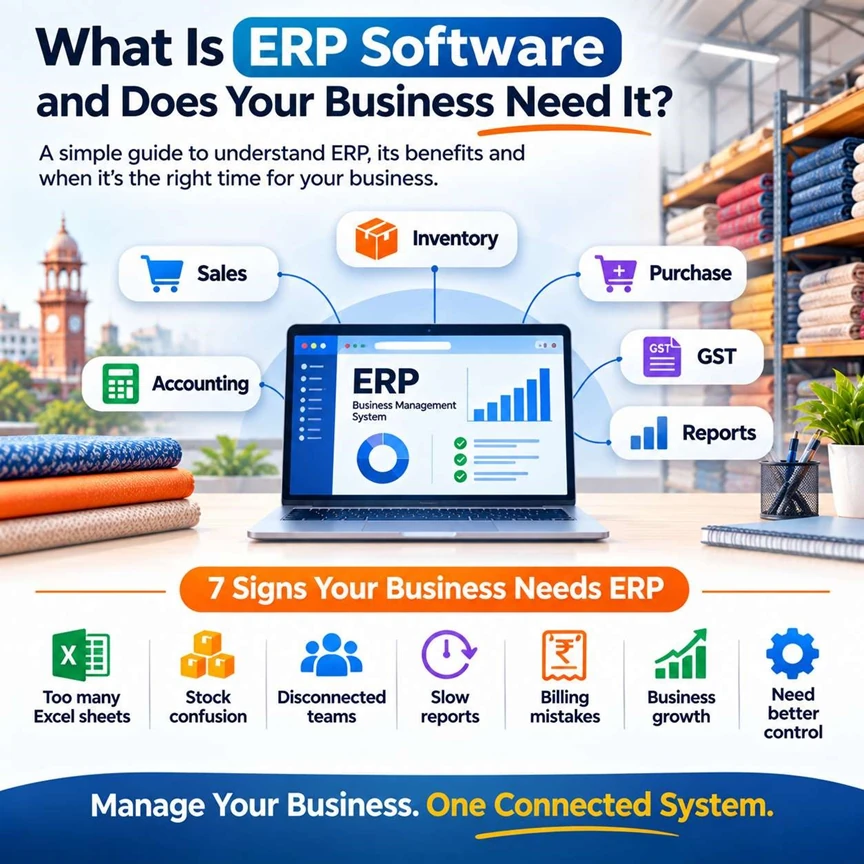
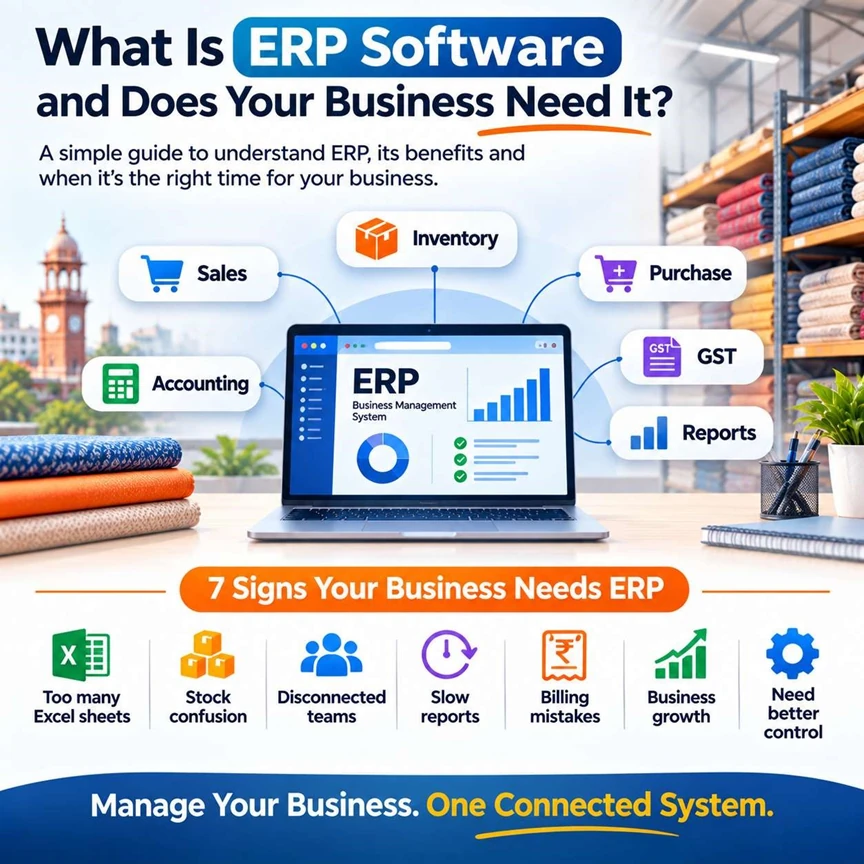
7 Signs Your Business Is Ready for ERP Software
Not every business needs ERP software from day one. But if you are facing the following problemsregularly, it may be time to consider a better system.
1. You Use Too Many Excel Sheets If your team maintains separate Excel files for stock, sales, purchases, customers and payments, it canbecome difficult to keep everything updated. Employees may use different versions of the same file, leading to incorrect information. ERP software can help bring these records into a more organised system.
2. You Don't Know Your Current Stock If you cannot quickly answer questions such as how much stock is available, which products arerunning low or where items are stored, inventory management may be becoming a problem. An ERP system with inventory features can help track stock movement, purchases, sales and availablequantities.
3. Your Teams Work in Separate Systems When sales, accounts, warehouse and production teams use different software, information mayneed to be entered multiple times. This wastes time and increases the chances of mistakes. An ERP system can connect different departments so that information is easier to share.
4. Reports Take Too Much Time If preparing monthly sales reports, purchase reports or stock reports takes hours or days, you may nothave the information you need when making decisions. ERP software can provide reports from recorded business data, helping management reviewimportant information more quickly.
5. You Frequently Make Billing or Data Entry Mistakes Manual data entry can lead to incorrect invoices, duplicate entries, missing payments andmismatched stock records. ERP systems can reduce repeated data entry when modules are connected properly. However, thesystem still needs accurate information and correct configuration.
6. Your Business Is Growing When your business has more customers, employees, products, branches or orders, managingeverything manually becomes harder. A system that worked for five employees may not work as smoothly for twenty or fifty employees. ERP software can help you organise operations as your business grows, depending on the system'scapacity and features.
7. You Want Better Control Over Your Business
Business owners often want answers to questions like:
- How much did we sell this month?
- Which products are moving faster?
- How much stock is available?
- Which customers have pending payments?
- What are our expenses?
- Which orders are delayed?
ERP software can bring relevant information into reports and dashboards, helping you make decisionsbased on your business data.
If you are facing three or more of these problems regularly, it may be worth evaluating ERP software.
Tally vs Cloud ERP vs Custom ERP: Which Should You Choose?
There are different types of business software available. The right choice depends on your businesssize, processes and budget.
1. Tally or Accounting Software Tally is a popular choice for businesses that mainly need accounting, GST, billing, banking and basicinventory management.
It can be suitable for small businesses that want to manage financial records without building acomplete business management system.
Best for:
- Small businesses.
- Accounting and billing.
- GST-related accounting.
- Basic inventory management.
- Businesses with standard accounting requirements.
TallyPrime's official India pricing currently lists Silver at ₹22,500 for a lifetime licence and Gold at ₹67,500, excluding GST, with rental options also available. Pricing can change, so check the official price before purchasing.
2. Cloud ERP Software
Cloud ERP is software hosted online that users can access through supported devices and internet connections.
Depending on the product, cloud ERP can include inventory, sales, purchase, accounting, reporting, customer management and other business features.
Best for:
- Growing businesses.
- Businesses with multiple locations.
- Teams that need remote access.
- Companies that want connected departments.
- Businesses looking for a subscription-based system.
Cloud ERP usually involves monthly or yearly subscription costs. Pricing may depend on users, features, storage, implementation and support.
3. Custom ERP Software
Custom ERP software is designed and developed according to your company's own processes and requirements.
If your business follows special workflows that standard software cannot manage properly, a customERP may be a better option.
For example, a textile company may need fabric-wise stock, colour and size variations, productiontracking, job work, batch management, wastage records and customised reports.
Best for:
- Manufacturing companies.
- Textile and garment businesses.
- Businesses with complex workflows.
- Companies using multiple disconnected systems.
- Businesses requiring special integrations or reports.
Custom ERP development costs more initially because the system needs to be planned, designed, developed, tested and deployed. The final cost depends on the number of modules, users, integrations and complexity.
ERP Software Cost in India
ERP costs depend on the software, number of users, features, implementation, customisation andsupport.
Here are approximate planning ranges for small and growing businesses. These are illustrativeestimates, not fixed quotations or universal market rates.
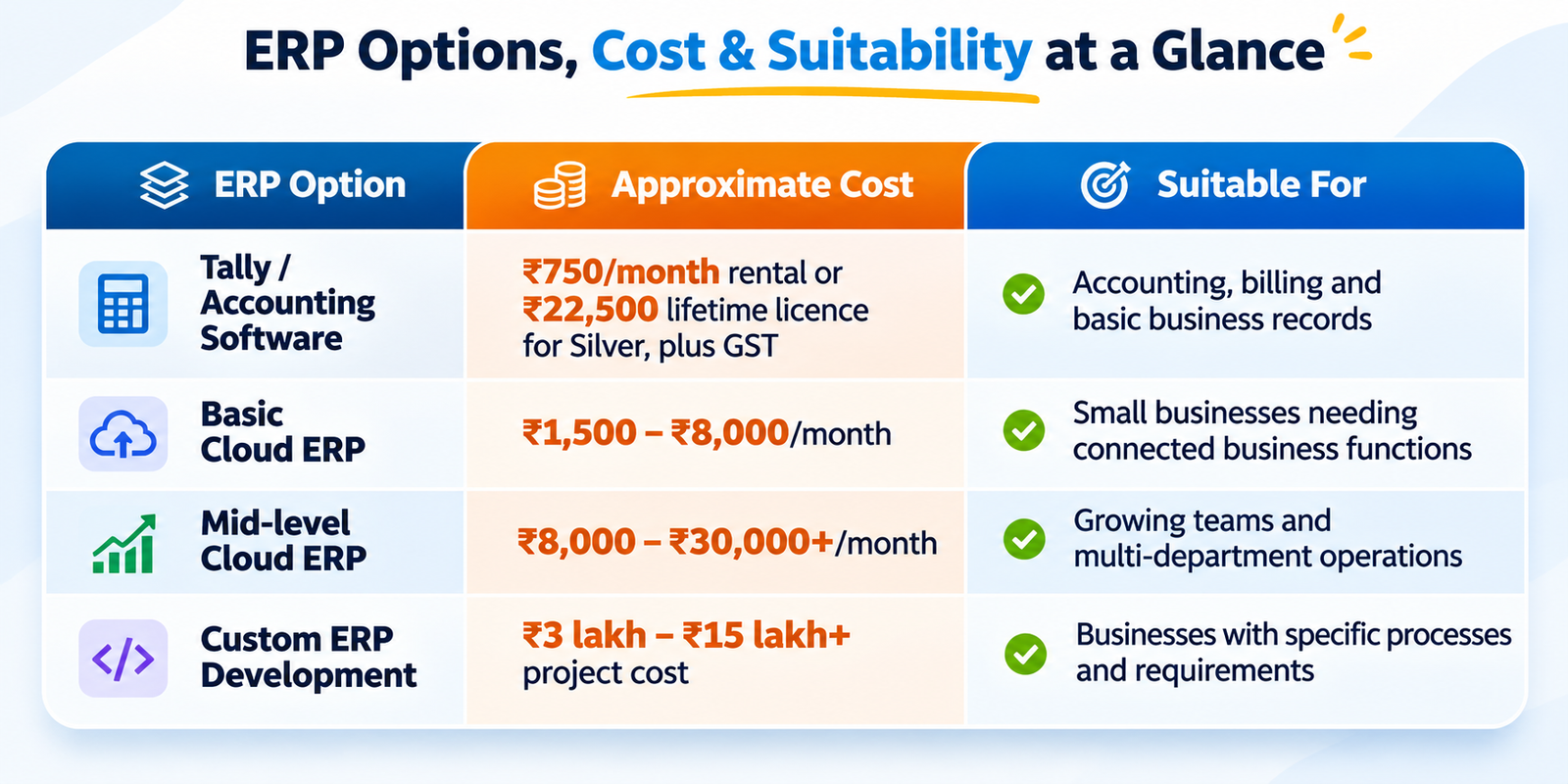
The custom ERP range is a rough budgeting guide. A larger manufacturing or multi-branch ERP cancost significantly more.
Before comparing quotations, check what is included:
- Software licence or subscription.
- Number of users.
- Implementation and setup.
- Data migration.
- Training.
- Customisation.
- Hosting and backups.
- Maintenance and support.
A lower price may not include everything your business needs.
Real Business Example: A Textile Company in Kanpur
Let's take a simple example of a textile company in Kanpur. This is an illustrative business scenario, not a claim about a specific real company.
The company purchases fabric from suppliers, stores different materials, processes orders and sellsproducts to retailers and wholesalers.
Initially, the company manages everything using Excel sheets and separate accounting software.
As the business grows, it starts facing problems:
- Stock information is not updated regularly.
- Employees cannot easily find the available fabric.
- Sales and warehouse records do not match.
- Purchase details are maintained separately.
- Management cannot quickly check order status.
- Reports take too much time to prepare.
The company decides to implement an ERP system.
The ERP connects purchasing, inventory, sales, production and accounts.
Now, when fabric is purchased, stock is recorded. When a sales order is created, available stock canbe checked. When goods are processed or dispatched, the relevant records can be updated.
Management can review stock, orders, purchases and sales from a central system.
The company still needs trained employees and accurate data, but it has a more organised way of managing daily operations.
This is one of the main reasons businesses consider ERP software: not simply to use new technology, but to reduce confusion and improve control.
ERP Software and GST Compliance in India
For Indian businesses, GST is an important part of billing and accounting.
A suitable ERP or accounting system can help manage GST-related records and make routineaccounting work easier.
Depending on the software and configuration, it may support:
- GST tax calculations on invoices.
- CGST, SGST and IGST entries.
- GST sales and purchase reports.
- Input tax credit records.
- HSN/SAC details.
- GST-related data for return preparation.
- E-invoice and e-way bill workflows, where applicable.
However, installing ERP software does not automatically make your business GST-compliant. You must use the correct tax rates, business details, invoice information and accounting recordsaccording to applicable GST rules.
GST requirements may vary based on turnover, business activity, transaction type and current regulations. Keep the software updated and work with your accountant or GST professional to verifyyour configuration and reporting.
A good ERP system can make GST-related work more organised, but proper accounting practicesremain important.
How to Choose the Right ERP Software for Your Business
Before purchasing ERP software, consider the following points:
Understand your requirements: Make a list of your current problems and the features you actuallyneed.
Check the modules: Confirm whether the software supports accounts, inventory, sales, purchases, production or other required operations.
Consider the number of users: Make sure the software supports your team and future growth. Check reporting: Confirm that you can generate useful reports without depending on manual Excel work for everything.
Ask about training: Your employees need to understand how to use the system correctly.
Check support and maintenance: Understand the support process, updates, backups and additional charges.
Think about future growth: Choose software that can support your business as its requirementschange.
Do not select ERP software only because another company is using it. Your business processes may bedifferent.
Final Thoughts ERP software can help businesses manage daily activities in a more organised way. It connectsimportant information, reduces repeated work and gives management better visibility into business operations.
If your company is still managing sales, stock, accounts and operations through multiple spreadsheetsor disconnected systems, it may be time to explore ERP solutions. Start by understanding your business problems, compare available software and choose a system thatfits your requirements and budget.
If your business needs a customised billing, inventory, ERP or POS solution, explore ERP and POSsoftware solutions from Backend Coders India.
The right ERP system should make your business easier to manage—not make your work more complicated.

Backend Coders India Editorial Team
Technical Research & Content Team • Backend Coders India
Written and reviewed by the technical engineering and digital search specialists at Backend Coders India, dedicated to delivering verifiable web architecture and transparent digital operations.


